Your new favorite keyboard.
Trade QWERTY for SQUEEZE. Squeeze the trigger, say the thing, let go. It lands where you pointed it. Free. No account, no subscription.
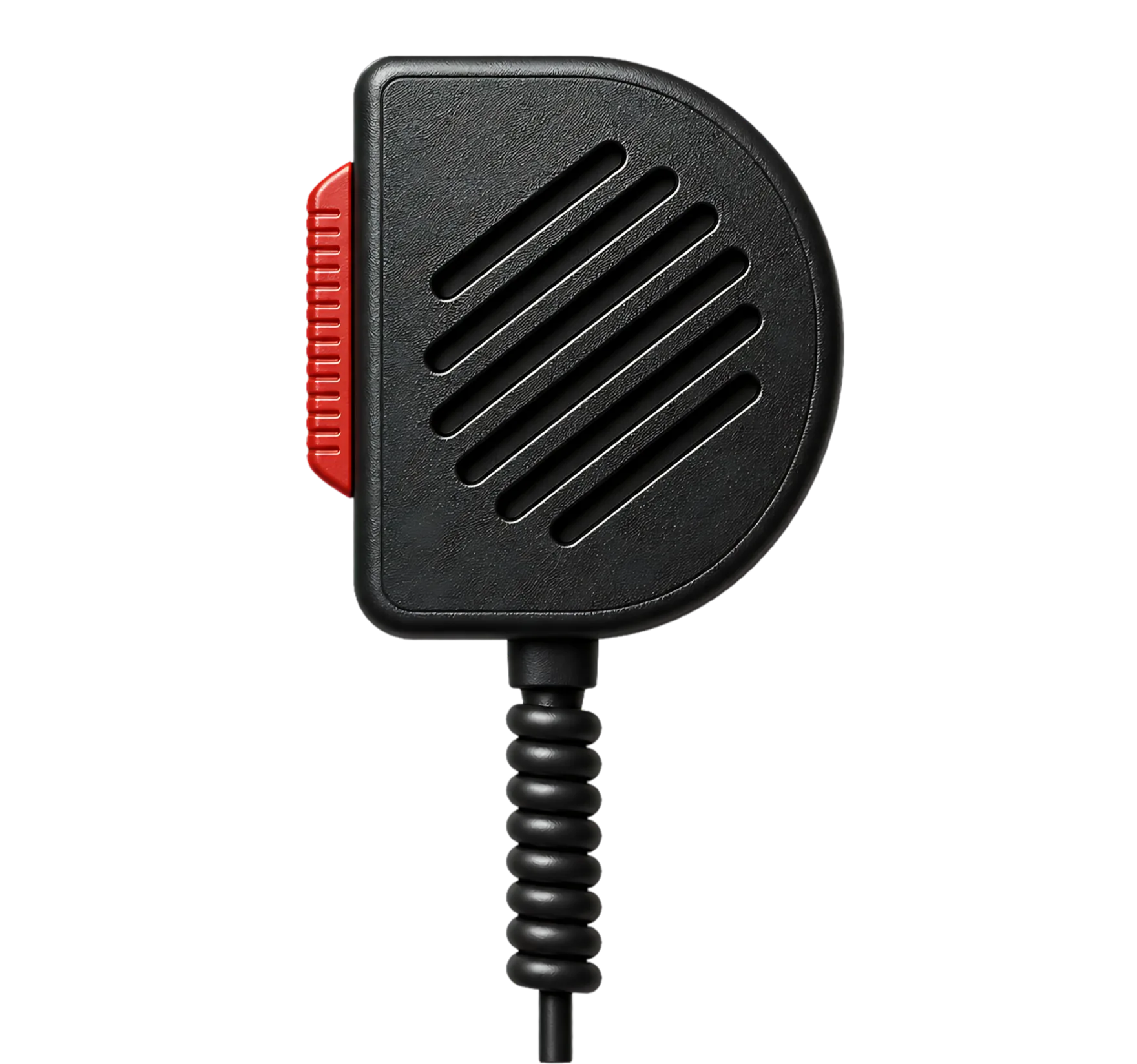
Does talking into thin air make you feel kinda stupid? Radio in with Dispatch.
Squeeze. Speak. Release.
A tone answers
Before you say a word, a tone names the active channel. No window opens. Nothing to look at.
Your Mac listens
Transcribed on device while you hold. Rambling allowed. The mic doesn't judge.
Words land
Text arrives where your cursor already is. Clipboard handed back the way you left it.
Three channels. One dial. Zero menus.
Each channel answers with its own tone, so your ears learn the positions and your eyes never leave the work.
Straight into the app you're in. Text arrives at your cursor, in any app.
For the thought that shows up mid-task. Filed away as markdown in a folder you pick. Flow intact.
For the thing you will forget by lunch. Each one lands as a line in todo.txt, a plain file any todo.txt app can read. Say "hashtag" and a word, and it files under that category.
Nothing you said gets lost.
Dispatch keeps what you dictate as plain text, one file per day, and reads your notes where they already sit. Each channel gets its own tab, and To-do's is a board of Next, Backlog and Done that you can filter by category. Pasted into the wrong window? Search, click the line and it's back on your clipboard.
Try it. Search for invoice, or drag the needle to To-do and tick one off.
Nothing leaves the machine.
No account. No telemetry. No audio sitting in a bucket somewhere. Transcription runs on Apple's on-device engine, and the only thing that ever goes out is nothing at all. What Dispatch keeps is plain text on your disk, and one switch stops it keeping more.
Or keep the app you already love.
Already use Superwhisper, Monologue, Willow or Wispr Flow? Keep it. Dispatch pulls the trigger; your app does the listening. Anything else works too: add it and record its shortcut. In passthrough your app does its own recording, under its own privacy policy. On device is our engine's promise, not theirs.
 Superwhisper
 Monologue
 Willow
 Wispr FlowSuperwhisper
Monologue
Willow
Wispr FlowSuperwhisper
Monologue
Willow
Wispr FlowSuperwhisper
Monologue
Willow
Wispr FlowSuperwhisper
Monologue
Willow
Wispr FlowSuperwhisper
Monologue
Willow
Wispr Flow
Wispr FlowSuperwhisper
Monologue
Willow
Wispr FlowSuperwhisper
Monologue
Willow
Wispr FlowSuperwhisper
Monologue
Willow
Wispr FlowSuperwhisper
Monologue
Willow
Wispr FlowSuperwhisper
Monologue
Willow
Wispr FlowFAQ
Do I need the microphone?
Yes. A keyboard shortcut would just put you back where you started, holding a shortcut. A trigger you can feel is the whole point. It is $35.
Which microphone?
The HYSHIKRA QX-18B, a CB-style USB mic, about $35 on Amazon. We don't make it and we don't resell it. The Amazon link is a referral, so a purchase kicks a few cents back here. See it on Amazon.
Does the microphone need setup?
No. Plug it in and quit the keyboard dialog macOS shows. Dispatch warns you before it appears. The app takes the trigger over at the system level. No driver, no vendor software and nothing on the microphone is ever modified. Unplug it and it's exactly the mic you bought.
Will a different microphone work?
Not today. The trigger is matched to the QX-18B's hardware ID, so another mic won't move the dial.
Why a CB microphone?
A trigger you can feel beats a shortcut you have to remember. It also looks tremendous on a desk.
What does setup involve?
Download, plug in, grant three permissions, each explained at the moment it is needed. First transcription in under five minutes.
Is this an AI assistant?
No. Dispatch routes to AI when you ask it to. Where a chatbot would speak, Dispatch beeps.
Does Dispatch keep what I say?
It keeps the words, never the audio. Every Dictate transmission is saved as plain text on your Mac, one file per day, so you can find it again in the ledger. Notes stay in the folder you picked, and the ledger reads them there. To-dos live in todo.txt, in a folder of their own. Dispatch sends none of it anywhere.
Can I turn the ledger off?
Yes. Settings has a Ledger page with a switch called Keep Dictate transcriptions. Turn it off and Dispatch stops keeping what you dictate. What is already saved stays until you delete it, from the ledger window or in the Finder.
Can I use my own to-do app?
If it reads todo.txt, yes. To-do writes the standard todo.txt format, one to-do per line, so the file the ledger's board shows also opens in sleek on the Mac, SwiftoDo on iPhone and iPad if the folder syncs there, or any text editor. Change it in one and the other follows.